Introduction to MCP
10 min read
Model Context Protocol (MCP) is an open-source standard that unifies the communication between AI applications and external data sources, tools, and workflows.
Anthropic launched MCP on November 25, 2024, and donated it in December 2025 to the Agentic AI Foundation (AAIF)—a directed fund under the Linux Foundation—where it is now stewarded neutrally alongside projects from Block and OpenAI, with support from Google, Microsoft, AWS, and others.
MCP has rapidly become the de-facto industry standard for building interoperable, scalable, and secure AI agents.
This tutorial offers an overview of MCP’s architecture, core features, and how it powers the next generation of agentic AI workflows.
Prerequisites
To follow this tutorial effectively, you should have a basic understanding of:
- Large Language Models (LLMs)
- Client-server architecture
- JSON and JSON-RPC 2.0
What is MCP?
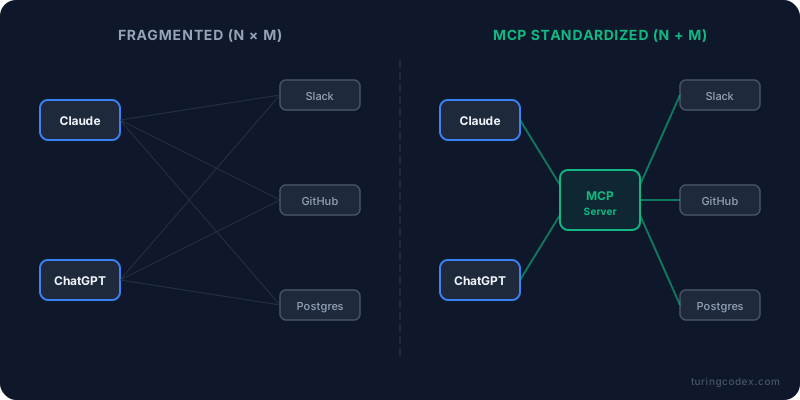
Before MCP, every connection between an AI model (such as Claude or ChatGPT) and an external system (such as Slack, GitHub, or a database) required a custom, one-off integration. This led to model sprawl, duplicated effort, and fragmented ecosystems.
MCP acts as the universal USB-C port for AI. Developers build a data source, tool, or workflow once as an MCP server, and it works instantly with any AI application or platform that supports the protocol.
MCP servers expose three core primitives:
- Tools: Executable actions (e.g., “create calendar event,” “run calculation”).
- Resources: Contextual data (e.g., file contents, database records, API responses).
- Prompts: Reusable templates or workflows (e.g., few-shot examples or specialized system prompts).
This “build once, use everywhere” approach dramatically accelerates development and unlocks richer agentic experiences.
Core Problems Solved by MCP
- Information Silos: Unlocks data trapped in legacy systems, private databases, local files, or enterprise tools.
- Development Complexity: Replaces hundreds of bespoke connectors with a single reusable standard.
- Context Loss: Provides structured, machine-readable payloads that preserve rich context across interactions.
- Static API Limitations: Enables dynamic, runtime discovery of capabilities—no hardcoded schemas required.
- Workflow Fragmentation: Standardizes not just tools and data but also prompt templates for consistent agent behavior.
Architecture: Hosts, Clients, and Servers
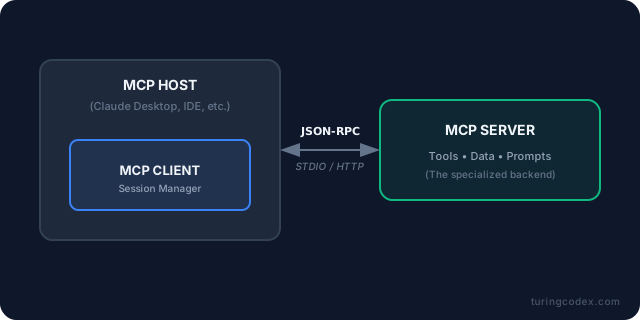
MCP uses a simple, bidirectional client-server model built on JSON-RPC 2.0. Communication occurs over two transports:
- STDIO (for fast, local servers on the same machine).
- Streamable HTTP (for remote servers, with standard auth like OAuth).
MCP Host
The AI application itself (e.g., Claude Desktop, VS Code with Copilot, Cursor, or ChatGPT). The host manages one or more MCP clients.
MCP Client
A lightweight connector inside the host that maintains a dedicated connection to a MCP server. It handles discovery, requests, and context delivery to the LLM.
MCP Server
The provider of capabilities. It runs locally or remotely and describes its resources via machine-readable JSON schemas.
Examples: A Postgres database server, a Slack connector, a local filesystem tool, a GitHub integration, or even a specialized agent exposing its own capabilities.
Key Interaction Patterns
MCP is designed for seamless, real-time AI operations.
Primary Pattern: Host-to-Server (Data Access & Execution)
This is the standard read/write flow:
- Discovery — The client queries the server at runtime (
tools/list,resources/list,prompts/list). - Retrieval (Read) — The AI fetches structured data (e.g., “Summarize my last five emails” via a Gmail resource).
- Execution (Write) — The AI performs actions (e.g., “Create a new calendar event for 2 PM” via a tool call).
Servers can also send notifications back (e.g., “tool list has changed”) and request LLM sampling or user input, making the connection truly bidirectional.
Enabling Agentic Collaboration
While MCP is fundamentally a client-server protocol (not a dedicated agent-to-agent protocol like A2A), its standardized context exchange and stateful connections make multi-agent workflows far more practical.
A planning agent can gather context via MCP servers and hand off structured resources/prompts to a specialized coding or research agent without losing history or requiring custom glue code. This eliminates repetitive instructions and reduces context fragmentation in complex agentic systems.
The Bidirectional Workflow: GitHub Integration Example
Here’s how a typical MCP interaction works with a GitHub MCP server:
- Connection Initialization — The AI host (client) establishes a secure connection (STDIO or HTTP) and performs capability negotiation.
- Runtime Discovery — The client asks: “What can you do?” The server replies with full JSON schemas: “I can search commits, read repository files, list issues, and create pull requests.”
- Data Retrieval (Read) — The user says, “Review recent changes in main.” The client requests resources; the server returns structured file contents and commit history.
- Analysis — The LLM processes the context and identifies improvements.
- Action Execution (Write) — The client calls a tool to create a draft pull request with the suggested changes.
- User Authorization — For any write operation, the host triggers explicit user approval (e.g., a confirmation dialog).
- Confirmation & Notifications — The server returns a structured success response and can notify the client of any follow-up changes (e.g., “PR #123 was merged”).
sequenceDiagram
    autonumber
    participant U as User
    participant H as AI Host (MCP Client)
    participant S as MCP Server (GitHub)

    Note over H,S: Initialization & Discovery
    H->>S: initialize
    S-->>H: result
    H->>S: notifications/initialized
    H->>S: resources/list
    S-->>H: result
    H->>S: tools/list
    S-->>H: result

    U->>H: "Review changes in main"

    Note over H,S: Context Retrieval
    H->>S: resources/read
    S-->>H: result (file content)

    Note over H: LLM Processes Context

    Note over H,S: Action Execution
    H->>U: User Authorization
    U-->>H: Approved
    H->>S: tools/call (create_pr)
    S-->>H: result (success)
    H->>U: "PR 123 created"
The entire loop is stateful, secure, and requires zero custom code on the AI side.
Security and Governance
Security is baked into the protocol from the ground up to prevent over-privileged AI behavior.
| Feature | Description |
|---|---|
| Sandboxing & Transports | Local STDIO servers are inherently isolated; remote HTTP uses standard web security (OAuth recommended). |
| Read-Only Defaults | Connections start with retrieval-only access unless explicitly escalated. |
| Explicit Authorization | All write/delete operations require human-in-the-loop approval via the host UI. |
| Capability Negotiation | Clients and servers declare supported features during initialization, preventing unsafe assumptions. |
| Runtime Discovery & Notifications | No hardcoded privileges—capabilities are described and can change dynamically. |
| Community Stewardship | Now governed by the neutral Agentic AI Foundation under the Linux Foundation, with broad industry backing (AWS, Google, Microsoft, OpenAI, and others). |
Runtime Discovery
Unlike traditional APIs where every endpoint must be hardcoded, an AI can connect to a brand-new MCP server it has never encountered before, read the machine-readable descriptions of tools/resources/prompts, and immediately begin using them—no developer intervention required.
Summary and Next Steps
Key Takeaways
- Standardization: MCP is the USB-C of AI—build once, integrate everywhere.
- Interoperability: AI hosts, tools, data sources, and workflows speak a common language.
- Agentic Power: Enables dynamic, context-rich agents that can safely read, act, and collaborate.
- Safety First: Granular permissions, human oversight, and neutral governance keep AI grounded and trustworthy.
Further Reading and Hands-On Resources
- Official Documentation: modelcontextprotocol.io
- Official Antrophic MCP Tutorial: Intoduction to Model Context Protocol
- Build Your Own Server: Use the official TypeScript SDK or Python SDK
- Stay Updated: Follow the Agentic AI Foundation for protocol updates, events (including MCP Dev Summits), and ecosystem news.
Comments