Variables and Data Types
12 min read
Variables
A variable is a named storage location that holds a value. It represents a specific memory address where a value, such as a number, text, or a more complex data structure, can be saved and modified during the execution of a program.
You can think of it as a labeled container; the label allows the program to find and use the data stored inside whenever it is needed.
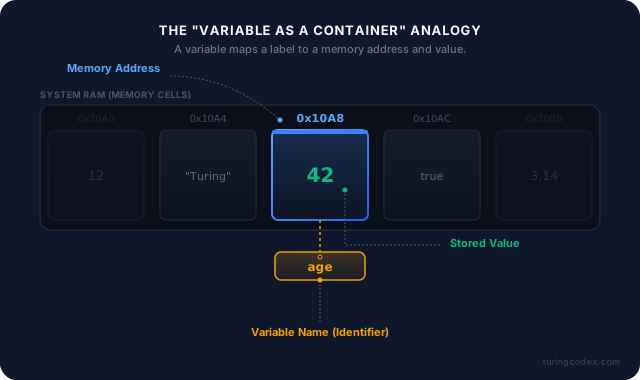
As a general rule when naming variables in your code, you should use descriptive names that clearly indicate the purpose of the variable. For example, if you are storing a person’s age, you should use a name like “age” instead of a name like “x”.
There are different naming conventions, which are used in different programming languages and projects:
- camelCase:
firstName,lastName,age,isStudent - PascalCase:
FirstName,LastName,Age,IsStudent - snake_case:
first_name,last_name,age,is_student - kebab-case:
first-name,last-name,age,is-student
Data Types
A data type is a classification that specifies what kind of value a variable can hold and what operations can be safely performed on it. In computer programming, it tells the compiler or interpreter how the programmer intends to use the data, ensuring that the system allocates the correct amount of memory and prevents logical errors, such as trying to multiply text or add a number to a file.
Data in the memory is stored as strings of ones and zeros. A data type provides a way to interpret those bytes of data. A byte is a unit of digital information that consists of 8 bits, which are binary digits that can be either 0 or 1.
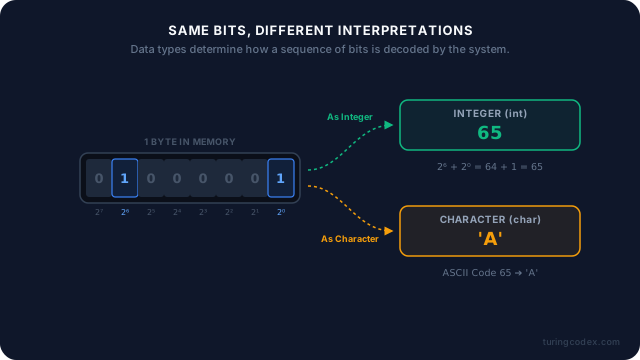
Data types are generally divided into primitive and composite categories.
- Primitive data types are the most basic building blocks built directly into a programming language, representing single values like integers, floating-point numbers, booleans, and individual characters.
- Composite data types are constructed by combining these primitive types to create more complex structures, such as arrays, lists, and objects, which can manage larger collections of related information.
The most common primitive data types are:
- Integers: Whole numbers, positive or negative (e.g. 42, -5, 0).
- Floating-point numbers: Real numbers (e.g. 3.14, -0.0025, 7.0).
- Booleans: Logical values, either true or false (e.g. true, false).
- Characters: Single characters, such as letters, numbers, or symbols (e.g. ‘a’, ‘B’, ‘?’).
You can write strings of characters using double quotes (e.g. “Hello World”) or single quotes (e.g. ‘Hello World’).
Operations
The operations you can perform on variables depend primarily on the data type of the value the variable holds.
For numeric variables, such as integers and floating-point numbers, you can perform standard arithmetic operations including addition, subtraction, multiplication, division, and modulus to find remainders.
Info
Text after # or // is ignored by the interpreter or compiler. These are called comments. They are used to explain the code or leave notes for yourself or others.
print means the result is displayed on the screen, in the console or output window.
print is a function, meaning it’s a reusable block of code that performs a specific task. You’ll learn more about functions in a future tutorial.
Modulus is the operator used to find the remainder of a division. It usually is noted with % symbol in the majority of programming languages. In pseudocode, you can also write mod.
Raising a number to the power of another number is noted with ** in Python, while in other programming languages, like C++ or Java, you can use a function like pow.
In pseudocode, I recommend using ^ or pow. For example:
You can also use assignment operations to update the value of a variable, either by replacing it entirely or by modifying it in place using shorthand operators like adding a number directly to the current value.
In most programming languages, = is used for assignment and not for equality comparison.
For variables holding text, known as strings, you can perform operations like concatenation to join two pieces of text together, or extraction to isolate specific characters or segments.
In pseudocode, you can use + for concatenation and [start:end] or substring(start, end) for extraction. For example:
Additionally, variables of almost any data type can be used in comparison operations, which evaluate relationships like equality, inequality, greater than, or less than to produce a trueor false result.
Logical operations, such as AND, OR, and NOT, are then used to combine or invert these boolean results, allowing programs to make decisions based on the state of multiple variables.
In pseudocode, you can use and, or, and not, or &&, ||, and !.